Studio Sessions
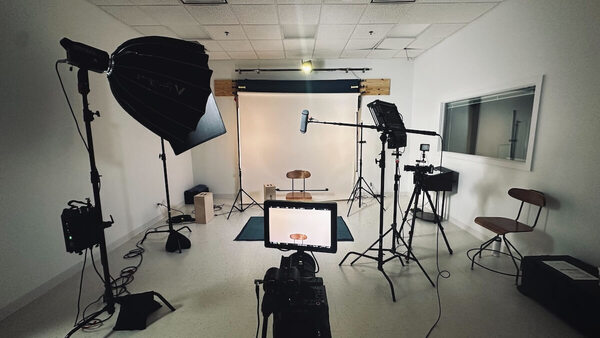
In addition to collaborating with instructors on larger projects, the Office of Digital Learning’s Creative Media Team is pleased to offer Notre Dame faculty access to and support using its Academic Media Studio in the basement of Flanner Hall to create short, simple, high-quality videos on tighter timelines.
These studio sessions are ideal for producing one-off, just-in-time videos that:
- clarify a tricky concept
- welcome students to a new module
- build presence in online and hybrid courses
- recap a key discussion
- provide flexibility for students who benefit from replayable content
- allow you to reallocate some of your in-person class time to more high-impact activities
Our team is there with you every step of the way, making sure you are able to record professional, student-focused media that’s ready to share quickly right through your Panopto.
What You Can Create
Studio sessions are built around lightweight, high-impact media formats suited for quick turnaround and strong student engagement. Examples include:
- Lightboard videos: Visually walk through equations, diagrams, or processes while facing your students (rather than a whiteboard)
- Screencasts: Narrate slides, websites, or software demos with clear voiceover and visuals
- Panopto mini-lectures: Record short course updates, introductions, or concept refreshers directly into your course platform
- Faculty messages: Create warm, short introductions or check-ins to build presence in online and hybrid courses
Each format is supported by our team, helping you focus on your teaching goals, not figuring out the technology.
Please note: Based on our experience and pedagogical best practices, videos of this nature should be approximately seven minutes or less. The studio sessions model is not for full class-length lecture capture.
How Studio Sessions Work
- Step 1: Plan (15–20-minute Zoom consultation) – Meet with our team to outline your idea and select the best media format for your goals. We’ll help you design a short, focused piece that complements your course.
- Step 2: Record (in studio) – Come to our studio in Flanner Hall for a supported recording session, during which you will have access to the lightboard, Panopto lecture, and screencasting setups. Although your finished product will be much shorter, studio sessions typically run for 30–60 minutes.
Completed videos are shared directly to your Panopto and, depending on the amount of post-production editing required, can be ready for you to use anywhere from several hours to a couple of weeks following your recording session.
Get Started
Studio sessions are currently in their pilot phase. There is no cost to you or your department, but the number of spots available each month is limited.
Other Projects
The Creative Media Team is able to provide editing support for studio session projects, but in order to accommodate as many faculty as possible, that support is intended to be basic. If you have an idea for a video project that will be more editing-intensive, please feel free to propose it through this form.