
Canvas Legends is a program at Notre Dame where students recognize instructors for the extra work they’ve put into their Canvas course sites. While some faculty seem like “old pros” at using technology to teach, many stress that their process has simply been iterative over time; they tried something new one year, then added to it the following semester, to create what eventually became a very useful teaching tool.
When Tarryn Chun, associate professor in the Department of Film, Television, and Theatre, arrived at Notre Dame, she brought with her some insider knowledge: She had spent some of her grad school years migrating courses into Canvas. That experience taught her a fundamental truth that many educators miss—just because Canvas can do everything doesn't mean it should.
For Tarryn, a successful course site isn’t about flashy features; it’s about reducing the “cognitive load” on students so they can focus on the learning exercises that will make them successful in the course.
The Architecture of “Less is More”
Tarryn’s philosophy begins with an intentional paring down of the digital workspace in her courses. She believes that the more tools visible to students on the Canvas course menu, the harder it is for them to find what they actually need. By hiding most content links (assignments, files, quizzes) and funneling everything through a single, streamlined path in Modules, she ensures that one location will keep students on track.
Within each module, she uses Canvas Pages to give context to the work students will be doing. “I have a page for each week that I update with the dates in a given semester,” she explains. “It has the assignments linked either to a PDF or to reserves.”
Engineering Accountability Through To-Dos
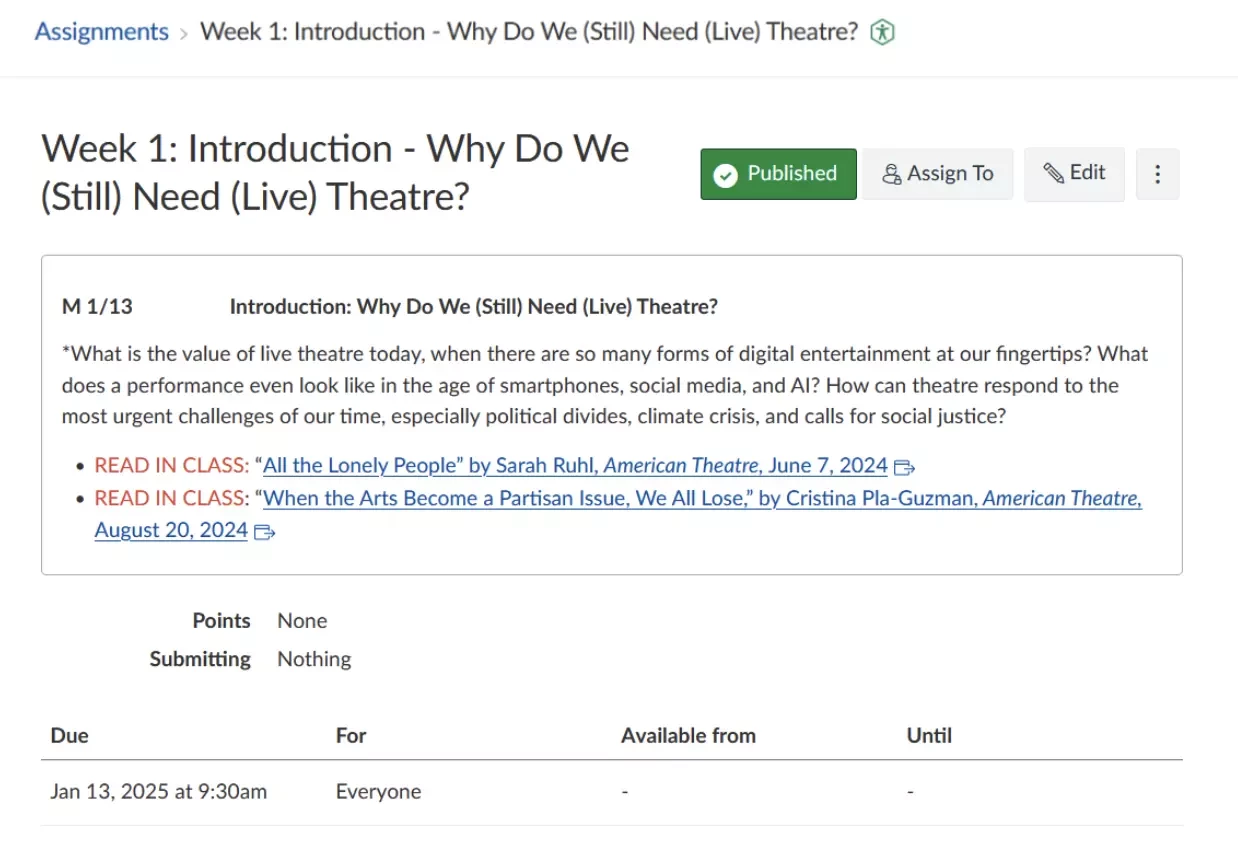
In the humanities and arts, the biggest hurdle is often getting students to treat prep work with the same urgency as a final paper. In a ten-person, discussion-based class, “faking it” isn’t an option; you either watch the performance and read the text, or the conversation stalls. This is especially true for her first- and second-year students.
“I find getting them to stay on top of the material they’re supposed to cover before class that day is the biggest challenge,” Tarryn says. To solve this, she no longer lists readings as just a list of files in her course. “I post readings as an assignment within Modules that have what they need to watch and read and do in class linked in it.“
By adding due dates to the prep assignments, they appear in a student’s dashboard to-do list and calendar, keeping them top-of-mind in an otherwise busy week. By making prep work an assignment, it creates a digital “nudge” that moves preparation from an optional selection to a required task with an approaching deadline, ensuring that when students show up to class, they are ready to actually engage.
Creating a Collaborative Space in Canvas
Because Tarryn’s classes are highly collaborative, she looks for ways to allow students to display and react to each others’ work. One way she accomplishes this is by integrating a class Google Drive directly into the menu bar—managed easily through a course listserv—which gives students a workspace that feels integrated and simple to use.
“I am never confused about what is due when, and everything is incredibly clear and well thought out. If she says she will adjust something on the syllabus, it’s adjusted in Canvas, too. If she announces something in class that’s important, it ends up in announcements on Canvas, too. Consistent, accurate, reliable, clear. A true Canvas Legend.” —One of Tarryn’s Students
She also uses Canvas Discussion forums as a public gallery where students can upload videos, embed YouTube clips, or share written responses. The Discussions forum allows students to respond to each others’ submissions in a meaningful way, no matter what medium they choose. It isn’t just about turning in work for a class; it’s about seeing, appreciating, and being inspired by each others’ creative output. For Tarryn, the technology is at its best when it gets out of the way and lets the students’ collective creativity take center stage.
Resources to Get Started
- Managing Course Navigation (hiding menu items from students)
- Creating Pages
- Embedding Panopto Videos in Canvas
- Using Discussions