
Canvas Legends is a program at Notre Dame where students recognize instructors for the extra work they’ve put into their Canvas course sites. While some faculty seem like “old pros” at using technology to teach, many stress that their process has simply been iterative over time; they tried something new one year, then added to it the following semester, to create what eventually became a very useful teaching tool.
Shawn Miller, associate teaching professor in the Department of Chemistry and Biochemistry, admits that he was a little surprised when he found out students nominated him for this recognition.
“My site is so utilitarian,” he says. But what he brings to his course design is simplicity and a clear path for learning.
Modules Provide a Clear Path to Learning
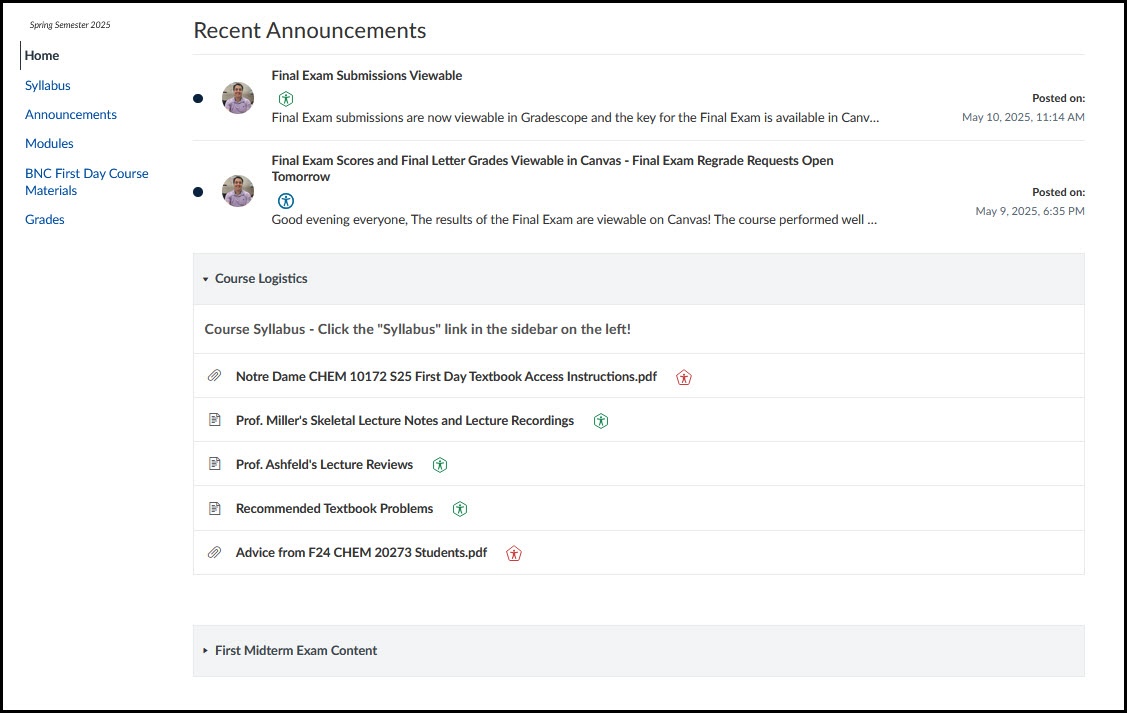
Once the semester is underway, Shawn focuses student attention to one place in the course site: modules. In fact, he makes the Modules Index his home page.
Shawn starts with a Course Logistics module, which features a link to instructions for using the online textbook, advice from students who took the course in the past, and a table with links to all lecture notes and recordings. Including all content in one easy location means that key information is not hard to find.
“I’m taking the approach of limiting the paths the students can take so that there’s only so many ways to do what they need to do,” he says.
And his classes appreciate it, with one former student remarking “I miss the organization of Organic Chemistry!”
Surfacing Key Dates to Keep Students on Track
Shawn doesn’t always have students submit work through Canvas, but he does create an assignment for each activity so that he can post a due date.
Students often use Canvas as a calendar. So even if they don’t directly interact with Canvas for a specific assignment, by having a due date it ensures that it’s in their calendar and their dashboard To-Do list, and they’re able to keep track of it. Those assignments are then added to the appropriate module in chronological order to keep the flow from assignment to assignment logical.
Visibility of Communication Through Announcements
While the overwhelming student feedback was about Shawn’s organization, several students mentioned how clear his communication methods were. A big part of that was his use of course announcements and the way he added them to the top of his home page for an added level of visibility.
“He organizes it in a very clear and easy format so that students can easily access content to prepare for exams as well as daily lectures.” —One of Shawn’s Students
“It’s hard for someone to say, ‘Oh, I’ve never seen the announcements,’” he points out, “because when you look at the page, it’s one of the first things you see.”
Even with a multi-section course where he is not the instructor for each section, surfacing a course-wide announcement can communicate to everyone who uses the course site, no matter which section they’re in.
Students often commented on the fact that, even with a content-rich course like Organic Chemistry, they always knew where to look to find the resources they needed. Shawn listened to the feedback he got from students over the years to provide them with the clear communication and purposeful organization that he knew would help them navigate a challenging course successfully. That’s a big reason why he was nominated as a Canvas Legend!