Digital accessibility in academic media aims to provide all users—including those with sensory, motor, and cognitive disabilities—an equal opportunity to meaningfully engage with course materials. By intentionally building accessibility into your videos from the start, you reduce the need for retroactive accommodations and create a more inclusive learning environment.
Accessible design improves clarity, usability, and learning outcomes for everyone.
Students interact with videos in different ways: Some watch in noisy environments, some rely on captions or transcripts, and others benefit from clear visuals and structured presentation. Designing with accessibility in mind provides multiple pathways for understanding and engagement.
Accessible course media align closely with effective multimedia learning practices (see Richard Mayer’s Principles of Multimedia Learning). When planning or reviewing a video, consider the following principles.
Reduce Cognitive Load
Avoid unnecessary visuals, sounds, or text that distract from key concepts. Streamlined design helps learners focus on essential information and reduces barriers to comprehension.
Provide Multiple Ways to Access Content
Students benefit when information is available in more than one format—for example, when narration is supported by visuals and captions. Offering multiple modalities increases flexibility and accessibility across learning contexts.
Design with Intentional Structure
Shorter, segmented videos allow learners to pause, revisit concepts, and process information at their own pace. Structuring content into manageable sections supports accessibility and learning effectiveness.
Practical Accessibility Guidelines for Course Videos
Captions and Transcripts
When posting or sharing video content, it’s recommended to share it in a way that allows multiple forms of access that are compatible with readers and other aids.
All instructional videos must have accurate captions.
Offer transcripts when possible so students can review content in a text-based format.
Note that audio-only content must have written transcripts.
Review auto-generated captions for accuracy, especially with technical terminology.
Captions support not only deaf or hard-of-hearing students but also multilingual learners and anyone viewing videos in sound-restricted environments.
Captions in Panopto
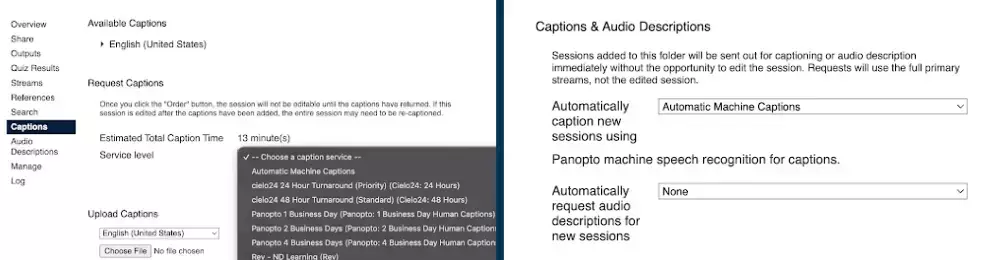
Panopto allows users to generate free automatic machine captions with 70–90 percent accuracy or order more accurate, human-reviewed captions for a fee.
Captions can be requested for individual videos within their own Settings, or users can set up automatic captioning within a folder so that every new upload or capture will automatically generate captions based on the selected service (Figure 1).
Figure 1. Panopto lets you order captions for individual videos (left) or for all videos in a folder (right).
Color and Contrast
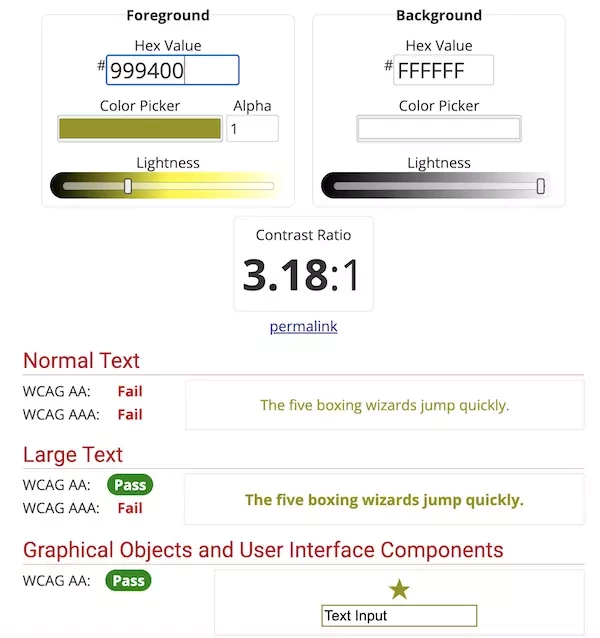
High contrast improves readability for students with visual impairments and helps graphics remain legible across devices and lighting conditions.
Use strong contrast between text and background visuals.
Rather than adding accommodations after a course launches, consider accessibility as part of your planning process. Small design decisions can significantly improve the learning experience for a wide range of students.
Accessible media benefits everyone: It improves clarity, supports flexible learning, and aims to deliver course content that is welcoming and usable for all.
If you have questions about how to integrate digital accessibility into your course materials, please contact the Office of Digital Learning (online@nd.edu).