
Canvas Legends is a program at Notre Dame where students recognize instructors for the extra work they’ve put into their Canvas course sites. While some faculty seem like “old pros” at using technology to teach, many stress that their process has simply been iterative over time; they tried something new one year, then added to it the following semester, to create what eventually became a very useful teaching tool.
Susan del Valle, associate teaching professor in the Department of Chemistry & Biochemistry, says she doesn’t love technology, but realizes the value of a solid Canvas course site. With lecture and tutorial details, an integrated textbook with homework, and valuable video tutorials, students need to access a wealth of information to be successful in her course.
Over the years, she has worked with Brianna Stines, a senior learning designer in Notre Dame Learning’s Office of Digital Learning, and others to find ways to capture students’ attention and keep their focus, which will improve their outcomes in the course.
Susan shared her advice in last April’s Canvas Legends presentation.
Take Your Time, But Get Started
First and foremost, Susan said, “take your time to build your Canvas site.” She has been refining her own course over the last three years and admits she was hesitant at first. But once she decided to dive in, she found the work rewarding and, ultimately, freeing. Her key message to colleagues: It doesn’t matter how small your first steps are—just start. A little progress each year adds up to something powerful.
Highlight the Important Things
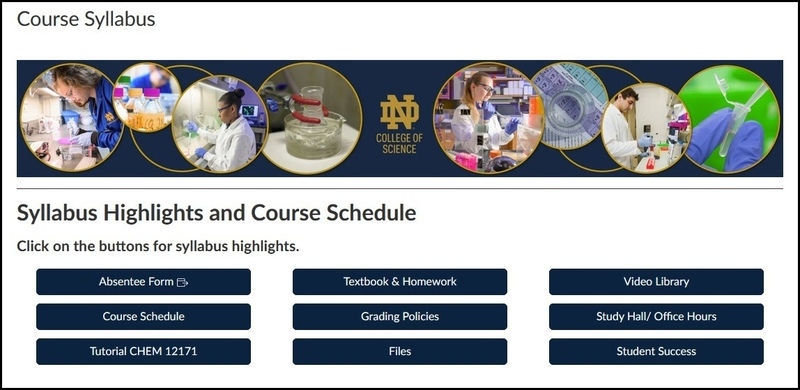
One of Susan’s biggest breakthroughs came with rethinking how she shares her syllabus, which contains important information about all the components of her course but didn’t get much attention from students. She brainstormed with Brianna and came up with a plan: Instead of just posting a dense 10-page document, she focused on calling out the most important parts, and used clickable buttons for quick access to grading policies, course schedule, and other essentials.
“I figured students don’t read the syllabus,” Susan said. “But if you make the syllabus into a bunch of buttons, they’ll actually click.”
The result? Students found what they needed on their own, and she was asked far fewer basic questions in the first weeks of class. That freed up her time to focus on teaching chemistry, not explaining logistics.
Modules Offer Clarity and Consistency
Susan also leaned on modules to bring order and rhythm to her course. She built exam-prep modules that followed a consistent formula, alongside week-by-week modules separated into required, recommended, and supplemental materials. That consistency gave students a clear roadmap while also letting her organize information in ways that worked for different needs. The result was a site students appreciated for its clarity and efficiency.
“Everything is easily accessible and clear. My professor keeps up with announcements, assignments, grades, feedback, practice problems, files, etc., and does a fantastic job with all of it. There is a lot of material on the Canvas page, but it is still the most navigable page out of all my classes.” —One of Susan’s Students
Multiple Paths to the Same Place
Perhaps Susan’s biggest lesson is accessibility, considering the many ways students may need to access her course materials.
Regardless of how a student jumps into the course, “all roads lead to Rome,” she explained. Whether a student starts from the home page, the syllabus, the assignments list, or files, they can still get to the course schedule and the homework links. Anticipating different paths meant fewer frustrations for students and more time for Susan to engage them in learning chemistry.
Her advice is simple: take advantage of NDL’s templates, start small, and keep building. The effort pays off.
Resources to Get Started
- How to Use Modules in Canvas
- Improving Your Canvas Course Website with a Few Clicks (CidiLabs Video Tutorials)
- NDL Templates for Course Design